
Quick Answer: Peacock has no channel number on DIRECTV. It is a streaming app from NBCUniversal, not a TV channel. DIRECTV sells it two ways: Peacock Premium on its own for $12.99 a month plus tax, or inside the Movies Extra Pack for $9.99 a month. The pack costs $3 less and adds eight extra channels, but only customers on a Signature TV package can buy it.
Prices were last checked on 5 October 2026 against DIRECTV’s add-ons page and Movies Extra Pack page, and Peacock’s own price notice.
What Channel Is Peacock on DIRECTV?
There is not one. You will not find Peacock among the numbered channels in the guide, the way you find ESPN or CNN. You open it as an app instead: on a DIRECTV Gemini box, a smart TV, a streaming stick, a phone, or at peacocktv.com.
The channel many people are really looking for is NBC. NBC is a local station, so its number on DIRECTV changes from city to city. Our guide to what channel NBC is on lists the numbers and explains why Peacock does not replace it.
Worth knowing: When DIRECTV put Peacock into the Movies Extra Pack, its announcement of 6 October 2025 listed a Peacock On Demand menu on channel 1197 for satellite customers. That is a menu of shows to play on demand. It is not a live Peacock channel.
How Do You Add Peacock to a DIRECTV Account?
You can add it while signed in, or with nothing but your account number. The screenshots below were taken in January 2026, so a button may have moved since.
If you can sign in
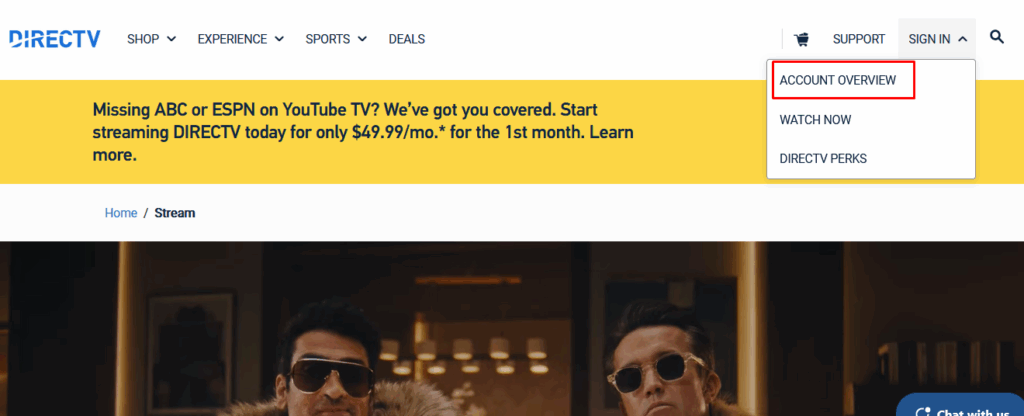
- Go to directv.com, or streamtv.directv.com if you stream DIRECTV over the internet. Open Sign In and pick Account Overview.
- Choose Manage My TV Package.
- Find the add-ons. Satellite accounts show them under TV. Streaming accounts show them under Premium Networks.
- Pick Peacock or the Movies Extra Pack, press Add and confirm. The charge goes on your DIRECTV bill.
If you only have your account number
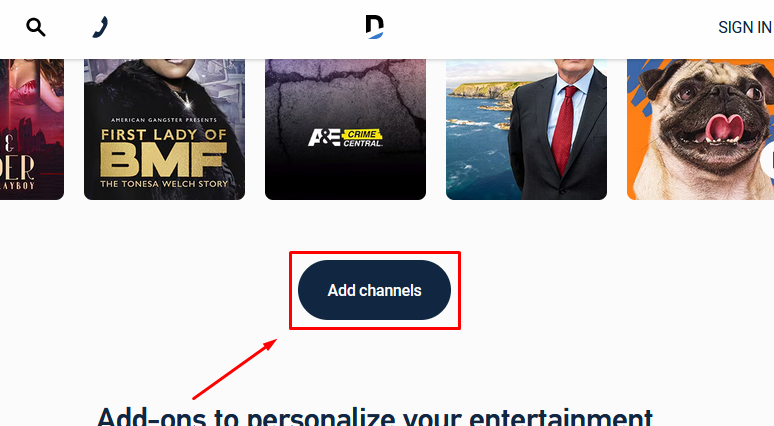
- Open DIRECTV’s add-ons page and press Add channels.
- On the sign-in box, choose Pay without signing in.
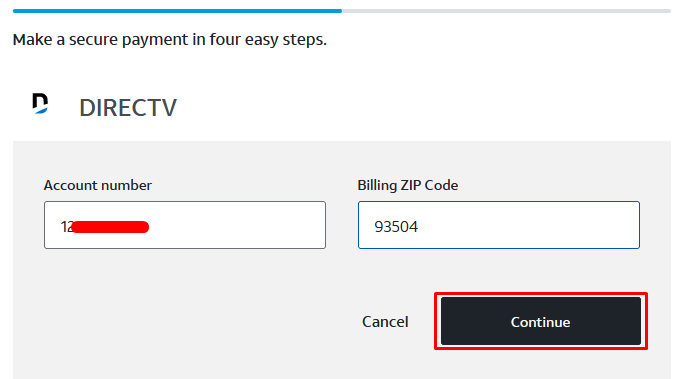
- Type your DIRECTV account number and billing ZIP code, then press Continue.
- Add your payment details and confirm the order.

After you order, DIRECTV sends an activation email. Follow its link to create or connect a Peacock login. Then sign in with that login on the Peacock app or at peacocktv.com. Peacock will not play until this step is done.
How Much Does Peacock Cost Through DIRECTV?
Peacock raised its prices on 18 August 2026, and DIRECTV’s add-on price followed. Here is what each route costs now.
| Way to get Peacock | Price | What you get | Who can buy it |
|---|---|---|---|
| Movies Extra Pack through DIRECTV | $9.99 a month | Peacock Premium (with ads) plus eight TV channels | DIRECTV Signature TV packages only |
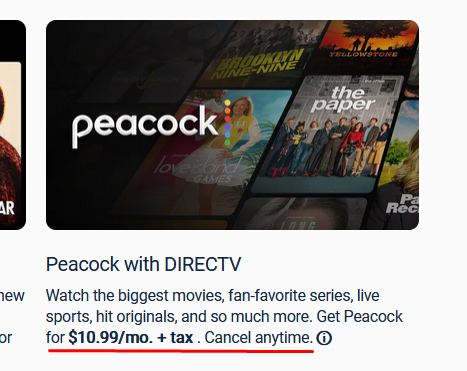
| Peacock Premium add-on through DIRECTV | $12.99 a month plus tax | Peacock Premium | DIRECTV customers, billed on the DIRECTV bill |
| Peacock Premium, direct from Peacock | $12.99 a month or $129.99 a year | Peacock Premium | Anyone |
| Peacock Premium Plus, direct from Peacock | $19.99 a month or $199.99 a year | Peacock’s top plan | Anyone. Not listed on DIRECTV’s add-ons page |
| Peacock Select, direct from Peacock | $8.99 a month or $89.99 a year | Peacock’s lowest-priced plan | Anyone. Not listed on DIRECTV’s add-ons page |
The pack is the cheapest way to get Peacock Premium that we found. Over a year it comes to $119.88. The stand-alone add-on comes to $155.88, so the pack saves $36. It even beats Peacock’s own annual plan by about $10, and you can cancel it in any month.
Note: Two lines in DIRECTV’s small print are worth reading. The pack renews at the “then prevailing rate”, so the price can change. And the pack page still calls Peacock Premium a $10.99 value, which was Peacock’s price before August. DIRECTV has not announced a new pack price. Check the figure on the order screen before you confirm.
What Comes in the Movies Extra Pack?
Besides Peacock Premium, the pack adds eight channels on DIRECTV channels 564 to 573. DIRECTV uses one national channel map, so that range is the same in every state.
- Hallmark Family
- Hallmark Mystery
- HDNet Movies
- Sony Movies
- Smithsonian Channel
- Crime + Investigation
- MTV Live
- ShortsTV
Signature is DIRECTV’s name for its four full packages: ENTERTAINMENT, CHOICE, ULTIMATE and PREMIER. The smaller Genre Packs, such as MySports and MyEntertainment, are a different product line. If you are not sure which you have, the plan name is printed at the top of your bill, and our DIRECTV channel lineup shows what each package carries.
Skip the pack if you want Peacock Premium Plus. DIRECTV’s add-ons page lists only Premium, so the top plan has to be bought from Peacock directly.
Is Peacock Worth Adding If You Already Have DIRECTV?
It depends on what you are missing. Peacock is where NBCUniversal keeps its originals, its back catalogue of shows and movies, and the events it streams. Some of those are on your NBC station too, and some are not.
NASCAR is a good test. The last three races of 2026 air on NBC and stream on Peacock. The races on USA Network do not stream on Peacock at all. Our NASCAR channel guide shows which race is where.
The pack suits a Signature customer who would pay for Peacock Premium anyway. It is the same service for $3 less. It is poor value if you would open Peacock twice a year. In that case, subscribe for one month when the show or game you want arrives, then cancel.
Other streaming apps work the same way on DIRECTV. Our guide to Paramount+ on DIRECTV covers that one.
What If Peacock Does Not Work After You Add It?
| Problem | Likely fix |
|---|---|
| No activation email arrived | Sign in to your DIRECTV account, open Manage My TV Package and use the Activate Peacock Premium link there. |
| You are charged for Peacock twice | DIRECTV says adding the pack does not cancel a Peacock plan you already pay for. Cancel the older one in your Peacock account. |
| You cannot find Peacock in the channel guide | It is an app, not a channel. Open the Peacock app on your Gemini box, TV or streaming stick. |
| The Movies Extra Pack is not offered to you | It is sold only with Signature TV packages. Check the plan name on your bill. |
One last tip if you already pay Peacock directly. Look up your next Peacock billing date first, cancel there, and add the DIRECTV version on that date. That way you never pay for the same service twice in one month.

The author specializes in U.S. cable, satellite, and streaming TV services, with hands-on experience analyzing channel lineups, regional restrictions, equipment requirements, and contract terms. All the content is written with clear, easy-to-understand explanations to help readers compare services accurately and make informed decisions.
1 thought on “Peacock on DIRECTV: Channel, Price and the Cheaper Way to Add It”